
Touring Tech Deep-Dive for Red Lion, PA Riders — 2026 Harley-Davidson® Street Glide® Ride Modes and Skyline™ OS
Eisenhauer's York Harley-Davidson® - Touring Tech Deep-Dive for Red Lion, PA Riders — 2026 Harley-Davidson® Street Glide® Ride Modes and Skyline™ OS
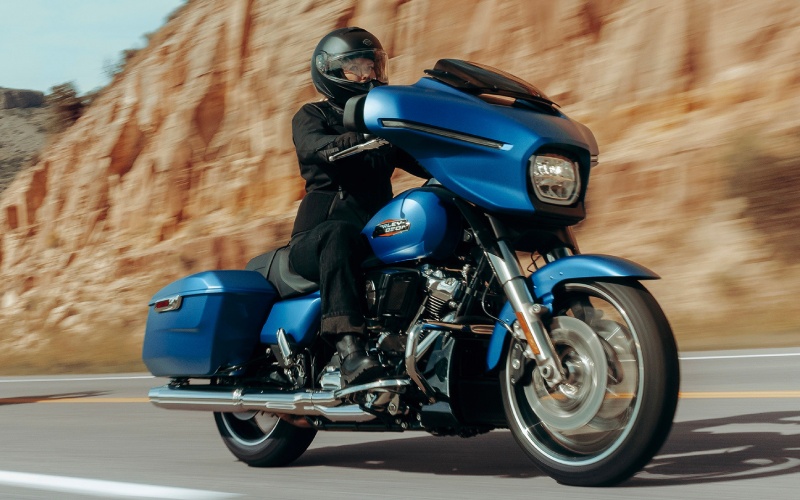
Touring riders around Red Lion, PA often ask how the latest infotainment and ride control systems translate to real roads. On the 2026 Harley-Davidson® Street Glide®, the Skyline™ OS 12.3-inch full-color TFT and the integrated ride modes deliver exactly what long-distance riders want—clean, straightforward control with minimal distraction. The interface anchors navigation, audio, and bike data in a single glanceable display, while ride modes let you tailor throttle response and traction strategies to the day’s conditions. Paired with the Street Glide® chassis and Milwaukee-Eight® 117 torque, the net effect is relaxed precision—more situational awareness and less cognitive load. That’s why Eisenhauer's York Harley-Davidson® sees so many touring riders gravitate to this platform for extended weekends and multi-state loops.
The Skyline™ OS interface centralizes riding tasks, so you are not shuffling between devices. Navigation guidance sits beside media controls, bike information screens, and integrated digital gauges. With Apple CarPlay support—wireless or via USB-C—riders can bring familiar mapping and voice control along for the ride. The handlebar and on-screen controls keep interactions predictable, and audio stays clear through the fairing speakers at speed. Combined with the smooth, steady airflow from the next-generation Batwing fairing, fatigue drops while your usable riding window expands.
For riders comparing touring setups, the Street Glide® ride modes are a genuine differentiator. Road calibrates for balanced, everyday control. Sport sharpens throttle response and pairs well with clean, open stretches where you want more immediacy. Rain moderates torque delivery for low-traction surfaces, while Custom allows you to fine-tune parameters to match your preferred feedback. These modes work in concert with the available Rider Safety Enhancements—systems like C-ABS, C-ELB, C-TCS, and C-DSCS—to help maintain composure during mid-corner braking, quick downshifts, or abrupt weather shifts. The result is confidence without complication, especially useful when routes blend freeways, backroads, and tight town grids.
To get the most from Skyline™ OS and ride modes on day one, it helps to set a simple baseline and gradually tailor from there. Many riders build two profiles—one for daily riding and one for loaded, long-haul travel. With that approach, you can shift between familiar setups as your riding changes across the season.
- Ride Modes: Start with Road to establish a baseline feel, then sample Sport and Rain on familiar roads to understand how the throttle map and traction strategies respond.
- Skyline™ OS Navigation: Save your go-to waypoints and mix between onboard navigation and Apple CarPlay to see which guidance style fits your habits.
- Audio and Communications: Balance speaker output and headset preferences early so you can keep prompts audible at highway speeds without overdriving volume.
- Device Integration: Use the USB-C port for sustained charging during all-day rides and reserve wireless connections for shorter stints to preserve phone battery.
Frequently Asked Questions:
What does the Skyline™ OS 12.3-inch display add for touring?
It consolidates navigation, media, and bike data onto a bright, full-color TFT with intuitive menus and digital gauges. With Apple CarPlay support and Bluetooth, you can streamline routing and communications without juggling devices.
How should I choose a ride mode for mixed conditions?
Use Road as your baseline. If the pavement is dry and open, try Sport for a crisper throttle. When traction drops, select Rain. If you have specific preferences, create a Custom profile that mirrors Road with small adjustments to throttle response.
Do Rider Safety Enhancements work with ride modes?
Yes. Systems like C-ABS, C-ELB, C-TCS, and C-DSCS complement the selected ride mode, helping manage braking force and rear-wheel slip in straight lines and corners. The goal is steady, predictable behavior that supports your inputs.
Is Apple CarPlay mandatory to use navigation?
No. Skyline™ OS offers integrated navigation, and Apple CarPlay is available for riders who prefer to bring their smartphone ecosystem into the cockpit. Both options are supported by clear audio prompts and legible mapping.
If you are planning your next loop serving Red Lion, Parkton, and Manchester, the 2026 Street Glide® pairing of Skyline™ OS and tailored ride modes offers a meaningful advantage in clarity and control. It turns setup into a one-time task and makes the rest of your ride feel simpler—so your focus stays on the road ahead.